Relay.app deleted its last paid workspaces on September 14, 2026. If you exported before the deadline, you already have everything you need to move to DeskFerry — in the exact format DeskFerry reads. If you didn't, this guide covers that too.
Relay.app told customers on July 16 that it was winding down. Free workspaces were deleted on August 15; paid workspaces followed on September 14. Every workflow, table, credential, and run log that wasn't exported is now gone.
If you're reading this, you're probably in one of two situations:
- You exported your workspace and have a .zip sitting in your downloads, and you're deciding where to rebuild.
- You didn't export in time and you're rebuilding from memory.
Either way, DeskFerry is a different kind of tool than Relay, and we want to be upfront about that before you spend an afternoon migrating. This post covers what carries over, what doesn't, how to rebuild step by step, and when you'd be better off somewhere else.
Disclosure: This article is published by DeskFerry. We include other tools where they're a better fit.
First, the honest part: DeskFerry is not a visual workflow builder
Relay was a canvas. You dragged in a trigger, chained steps, added a Path for branching, dropped in a human approval, and looked at the whole thing as a diagram.
DeskFerry doesn't have that canvas. You describe a job in plain English — "Every weekday at 8am, pull new HubSpot leads, research each company, draft a first email, and post the ones worth calling into Slack, but check with me before posting" — and DeskFerry builds an agent that runs it across your connected apps. The agent decides how to handle each case based on your instructions rather than following a fixed diagram.
If you loved Relay because of the canvas — because you think in boxes and arrows, or because your team needs to audit the exact branching logic visually — Make or n8n will feel more like home, and we've said so at the bottom of this post.
If you loved Relay because you could describe a workflow in plain language and have the AI assistant build it, and because it put a human approval step exactly where you needed one, DeskFerry is the more direct successor. Those two things are the core of the product, not features bolted on.
Why Relay's export was made for a tool like DeskFerry
When Relay built its export, it knew its JSON format wouldn't import anywhere else. So alongside the raw JSON, it generated a build prompt for every workflow, sequence, and agent: a plain-English description of the trigger, each step in order, the conditions between them, and where humans were asked to approve.
Relay's own guidance was to hand that prompt to an AI assistant and let it rebuild the workflow. Zapier's migration guide tells you to paste it into Copilot, which then produces a Zap you finish configuring by hand.
DeskFerry's Agent Builder takes plain-English instructions as its native input. There's no intermediate translation into a canvas. The build prompt Relay generated is, with light editing, the agent instruction you'd have written from scratch.
That's the whole migration, conceptually. The rest of this post is the mechanics.
Relay → DeskFerry: what maps to what
| Relay concept | DeskFerry equivalent | Notes |
|---|---|---|
| Workflow | Agent (Agent Builder) | One Relay workflow → one agent. Multi-step, multi-app jobs. |
| Simple one-off or repeating task | DeskFerry Assist | For the two-step stuff. Same account, same 1,500+ apps. |
| Trigger (app event) | App trigger | Fires when something happens in a connected app. |
| Trigger (schedule) | Recurring schedule | Hourly, daily, weekly. |
| Path / conditional logic | Described in the instruction | "If the lead is enterprise, do X; otherwise Y." The agent reasons; no branch nodes. |
| Human-in-the-loop approval | Human approvals | Hold the agent before it sends, updates, or spends. Same idea as Relay's. |
| Sequence (reusable steps) | Custom skill | A reusable capability you teach once and share across agents. |
| Agent | Agent | Relay agents map most directly of anything. |
| Table | Connected Sheets / Airtable / Notion + Knowledge | No native table. Read-only reference data → Knowledge; read-write → a connected spreadsheet or database. |
| MCP Server | No direct equivalent | Check the 1,500+ app catalog first; for anything missing, contact us. |
| Run history | Activity log | Every run, every app touched, every pause. |
| AI credits + steps | Credits | Metered on how much work the agents do. Unlimited agents on every plan. |
| ~200 apps | 1,500+ apps | Gmail, Slack, HubSpot, Salesforce, Notion, Zendesk, Jira, Stripe, Sheets, and more. |
| Starting price $19/mo | Starting price $49/mo (Growth) | Pro $99, Scale $299. 7-day free trial. |
Step 1: Find your Relay build prompts
Relay's export lived under Settings → Workspace → Export. It produced a zip of every workflow you could access — definition, build prompt, and recent runs — and emailed you a download link that stayed valid for 48 hours.
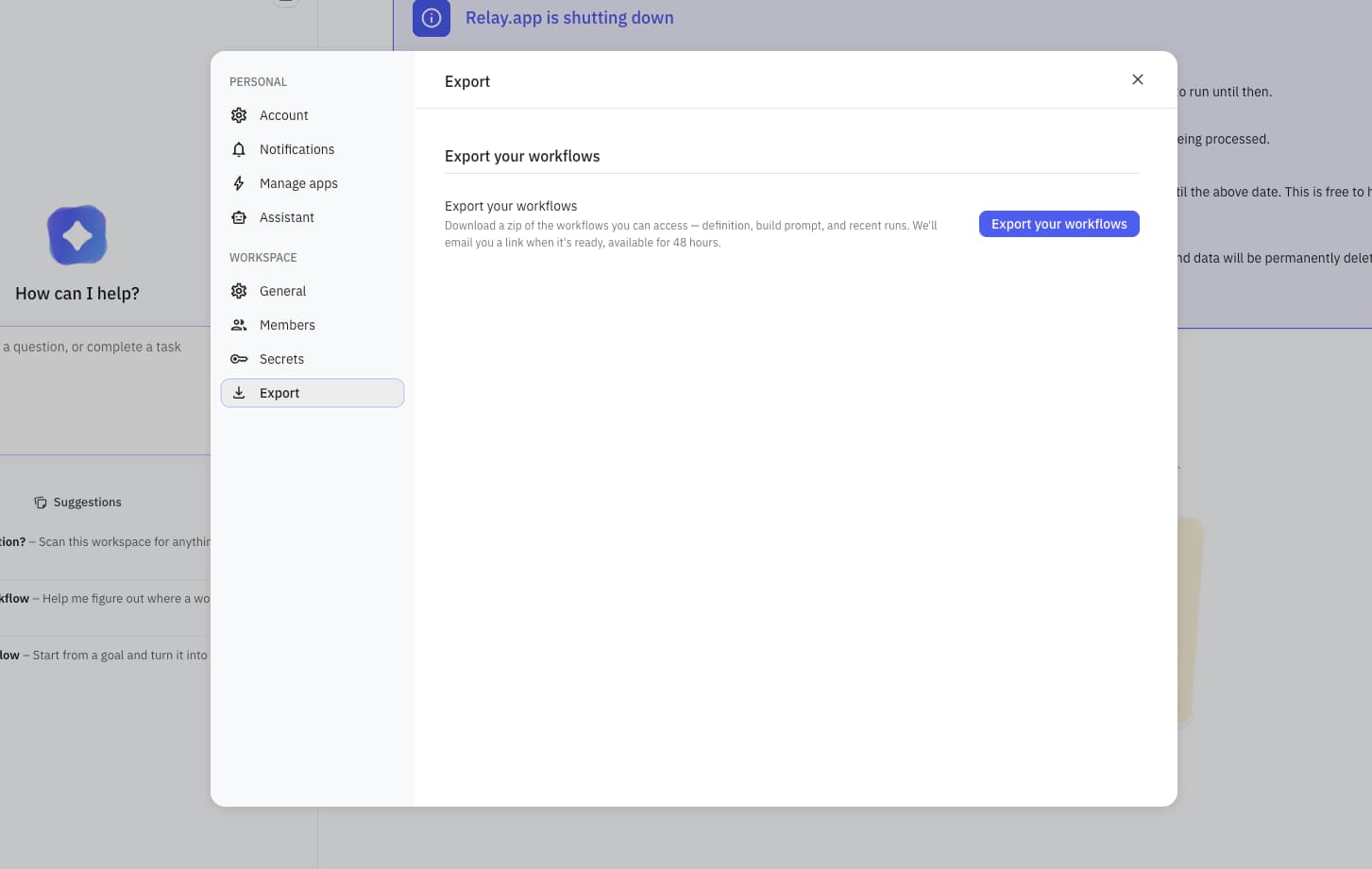
If you exported your workspace before the deadline, you have a .zip with one folder per Workflow, Sequence, Agent, MCP Server, and Table. Open a workflow folder and you'll find:
- A build prompt (
.md) — this is the file you want - The workflow structure as JSON — Relay's internal format, not useful elsewhere
- Run history as CSV, and one JSON per run — useful for testing later
- Table data as CSV, where relevant
Relay also showed the same build prompt inside each workflow, in a "Build prompt for workflow" dialog with a Copy prompt button. It lists the apps to connect, the trigger, and each step in plain English. That's the text you'll paste into DeskFerry in Step 2.
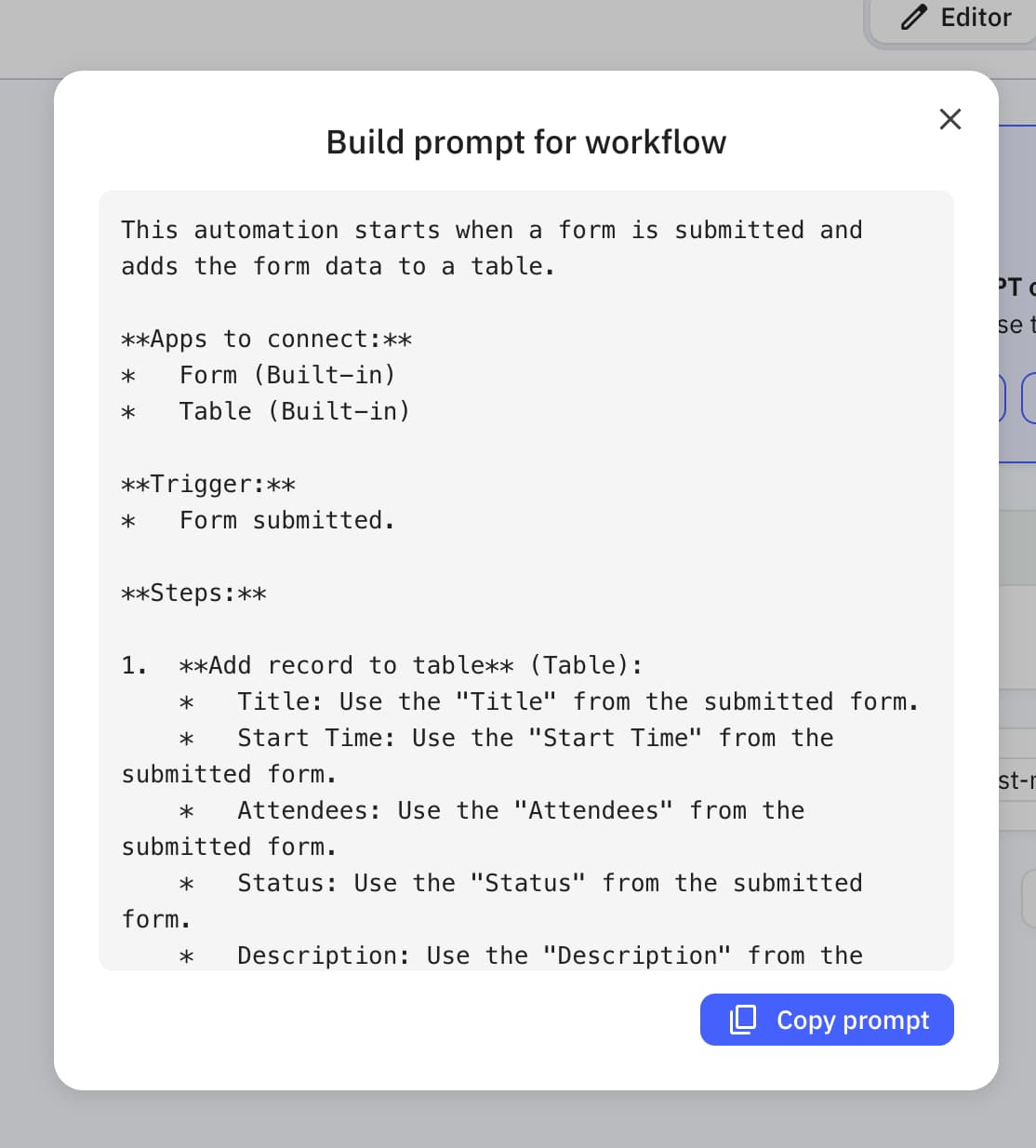
Pull every build prompt into one place. Before you rebuild anything, do a quick triage:
- Which workflows actually ran in the last 90 days? The run history CSV tells you. Anything with zero runs probably doesn't need to move.
- Which ones touch money, customers, or external sends? Rebuild these first and put approvals on them.
- Which ones were duplicates or near-duplicates? Relay's per-workflow model encouraged sprawl. A single DeskFerry agent with a clear instruction can often replace three Relay workflows that differed only in a filter.
Step 2: Rebuild each workflow as an agent
Open DeskFerry and start a new agent in Agent Builder. NEO, the builder's assistant, asks what the agent should do and wires up the tools, triggers, and rules for you. Paste the build prompt into the "Ask to automate anything…" box, or pick Describe the workflow and walk through it.
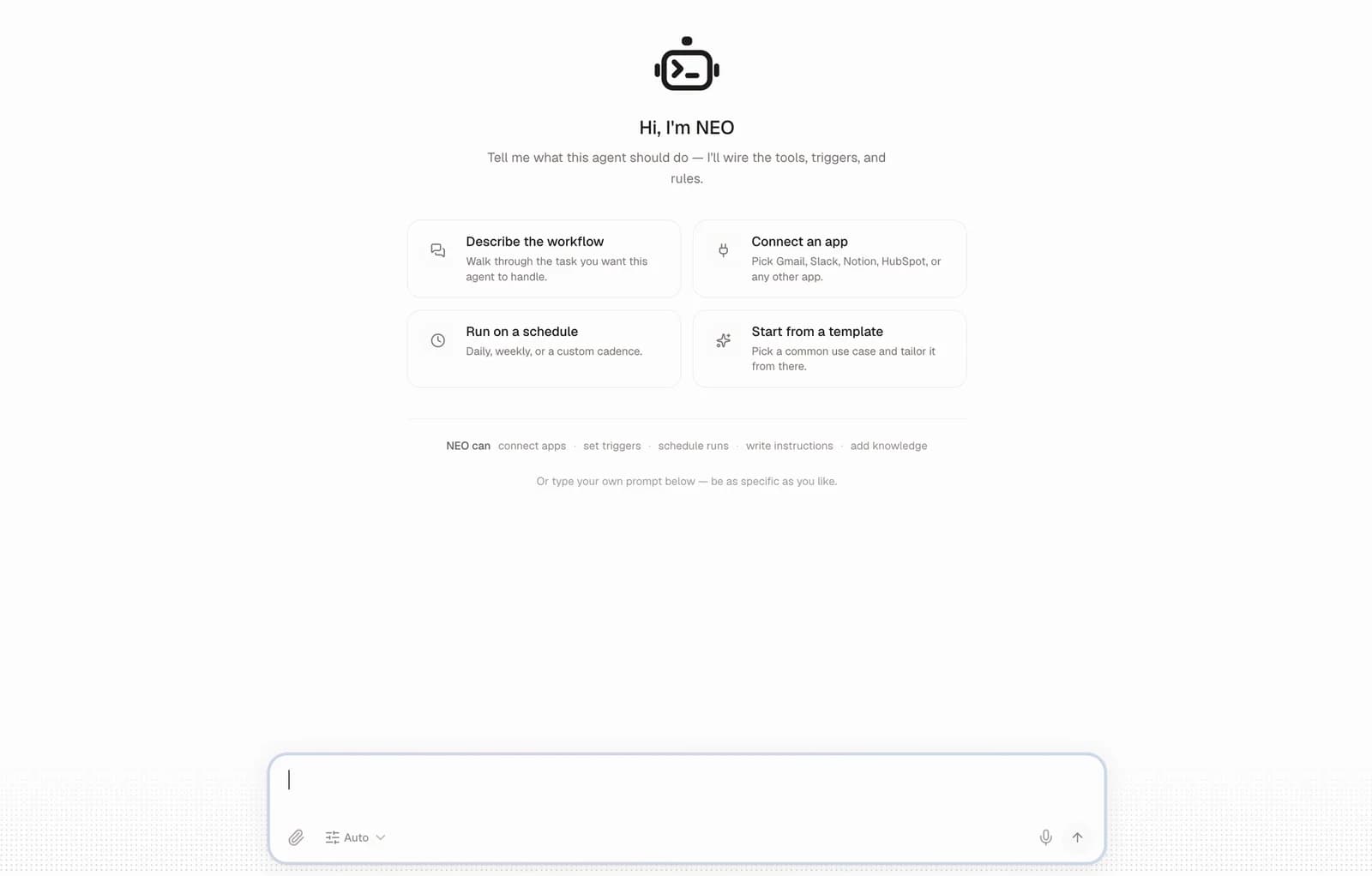
Then edit the prompt — Relay's prompts were written to describe a canvas, and a few things read better once you translate them.
Collapse the step numbering into intent. Relay's prompt will say something like "Step 3: Filter where deal value > 10,000. Step 4: If true, send Slack message. Step 5: If false, end." Rewrite it as "Only alert Slack for deals over $10,000." The agent doesn't need the control flow spelled out; it needs the rule.
Turn Paths into plain conditions. Every Relay Path becomes an if/otherwise sentence. Three-way branches become three sentences. If a branch was doing something wildly different from the others, consider whether it should be its own agent.
Keep your approval points exactly where they were. Relay users tended to put human approval right before the irreversible step — the send, the CRM update, the payment. Do the same. Tell the agent "Check with me before sending any email" or "Hold for approval before updating Salesforce." DeskFerry will pause the run and wait.
Move reference data into Knowledge. If a Relay workflow read from a Table to look things up — pricing tiers, routing rules, account owners — upload that CSV as a Knowledge source, or connect the Google Sheet it came from. The agent reads it before every task.
Set the trigger last. Pick the app event or schedule that started the Relay workflow. If Relay was polling something on a schedule because it lacked a native trigger for that app, check whether DeskFerry has the native trigger now — with 1,500+ connectors, it often does.
Choose your model. Relay used its own AI assistant. DeskFerry lets you pick from OpenAI, Anthropic, Google, xAI, and others per agent, with no API keys. For workflows that do a lot of drafting or classification, this is worth experimenting with once things are running.
For a deeper walkthrough of writing instructions, guardrails, and tests from scratch, see how to create an AI agent.
Step 3: Reconnect, test against your run history, and go live
Relay deleted every stored credential and OAuth token at shutdown, so every app needs reconnecting in DeskFerry. This is one-click OAuth for most of the catalog, but budget the time — a workspace with 30 workflows might touch 15 apps.
Then test. This is where the run history you exported earns its keep: open the CSV for a workflow, pick a few real past runs, and feed the agent the same inputs. Compare what it produces against what Relay produced. For anything with an approval step, run it once and confirm the agent actually pauses where you expect it to.
Once the output matches, switch the trigger or schedule on. The Activity log records every run from here — what the agent did, which apps it touched, where it held for approval — so nothing fails silently.
If you didn't export before the deadline
Your Relay data is gone, but your workflows aren't — they exist in your head, in your team's habits, and in the apps Relay was writing to.
Start by going into those apps and looking at what Relay left behind: the Slack channel with the daily lead brief, the Notion database that got updated, the Gmail labels, the CRM fields. Each artifact tells you what a workflow did and roughly when it ran. Write down each one as a sentence: "Every morning, something posted new HubSpot leads to #sales with a one-line company summary."
That sentence is already most of a DeskFerry agent instruction. You're describing the job the way you'd brief a new hire, which is exactly what Agent Builder is asking for. You may find that rebuilding from the outcome rather than from Relay's step diagram produces a cleaner agent anyway.
If you're stuck, DeskFerry Assist is a good way to reconstruct: ask it to "catch me up on Slack and Gmail" and look for the patterns Relay's automations left in your inbox.
Where DeskFerry isn't the right landing spot
We'd rather you land somewhere that fits than churn out of DeskFerry in a month. For a side-by-side of six options, sorted by what you used Relay for, see our Relay.app alternatives guide. For head-to-head detail, we also have DeskFerry vs Make, DeskFerry vs n8n, and DeskFerry vs Zapier breakdowns.
You need a visual canvas. If your team debugs by looking at the flow, or compliance requires the branching to be inspectable as a diagram, Make is the closest cousin to Relay — node-based, with Routers and Iterators for branching, and 3,000+ apps. Its learning curve is steeper than Relay's was, and its AI builder is newer than Relay's, but the mental model transfers directly. If Make itself doesn't suit, see our roundup of Make alternatives.
You want to own the infrastructure. n8n is self-hostable and code-friendly, with 500+ built-in integrations. You get total control, and you also take on hosting, retries, and patching. It's the right choice for engineering-led teams and the wrong one if Relay's appeal was that you never thought about any of that. There are other n8n alternatives if you want less upkeep.
You're already deep in Zapier. If the rest of your company runs on Zaps, Zapier's Relay migration guide is thorough and Copilot will take the same build prompts. You'll get 9,000+ apps and mature governance. What you won't get is an agent that reasons through the messy middle of a task — Zapier's model is still trigger → fixed actions, with AI as a step inside it rather than the thing doing the work. Our Zapier alternatives comparison covers the agent-first options.
Your workflows were mostly deterministic data plumbing. If a Relay workflow was "new row in Sheets → create Airtable record → post to Slack" with no judgment involved, an agent is more than you need. Any of the tools above will do it cheaper per run. DeskFerry earns its place when the workflow involves reading, deciding, drafting, or research — the parts you'd otherwise hand a person. (More on that line in AI agent workflows.)
Relay shutdown FAQ
Can I still get my Relay data? No. Relay deleted free workspaces after August 15, 2026 and paid workspaces after September 14, 2026, including all stored data and credentials. If you have an export .zip, that's what exists. If you requested an export and got the emailed link, note that those links expired 48 hours after generation.
Do Relay workflows import into DeskFerry automatically? There's no one-click importer, because Relay's JSON is in Relay's own format. But the build prompt Relay generated for each workflow is plain English, and that's what DeskFerry's Agent Builder takes as input. Paste, edit, connect apps, test.
What happens to my Relay app connections? Relay deleted them at shutdown. You'll reconnect each app in DeskFerry via OAuth.
I had Relay Tables. Where does that data live now? DeskFerry doesn't have a native table. For data the agent only needs to read, upload the CSV as a Knowledge source. For data the agent needs to write to, connect Google Sheets, Airtable, or Notion and point the agent at it.
What does DeskFerry cost compared to Relay? Relay started at $19/month. DeskFerry's entry Growth plan is $49/month, with Pro at $99 and Scale at $299 (see pricing). Every plan includes unlimited agents; you're paying for how much work they do. Every plan starts with a 7-day free trial.
I was a Relay annual customer. Am I owed a refund? Relay said annual customers would receive automatic prorated refunds for unused time. That's between you and Relay (billed through Paddle); check the confirmation email from July.
Rebuilding from a Relay export? Start a free DeskFerry trial — paste your first build prompt and see how far it gets you.