There are three ways to build an AI agent: write it yourself in Python against an LLM API, assemble it from a framework like LangChain or CrewAI, or describe the job in plain English to a no-code builder. The first takes days to weeks, the second hours to days, and the third minutes — and the right choice depends far more on how novel your logic is than on how technical you are.
This guide walks all three. You'll get a working definition of what an agent actually is, the prep work that decides whether your agent survives contact with real data, an honest walkthrough of each build method with its real costs, and the parts that apply no matter which path you pick: memory, scheduling, human approvals, testing, and the four mistakes that kill agents in production. If you've been searching how to make an AI agent and landing on tutorials that stop at a chatbot demo, this is the version that gets to production.
A year ago, all three paths ran through Python. Today the people who benefit most from agents — solo founders, operations managers, small business owners — are rarely the people who want to write it, and they no longer have to.
What an AI Agent Actually Is (vs. a Script, vs. a Chatbot)
An AI agent is software that takes a goal, decides which steps to run, uses tools to interact with the outside world, and produces a result — all without you directing each step. That last part is what separates an agent from a chatbot or a script.
A chatbot answers one message at a time. Ask it something, it responds, the conversation ends. It doesn't take action on your systems. (We've written a longer breakdown of what a chatbot is and where it stops being useful if you want the comparison in detail.)
An RPA bot (robotic process automation) follows a fixed sequence of clicks and keystrokes. It's deterministic and brittle — change the UI and it breaks.
A script — or a simple automation like a Zapier trigger — does exactly what you told it, every time. It has no judgment. If the input doesn't match what you anticipated, it either crashes or does the wrong thing confidently.
An agent sits above all of them. It uses a language model as its brain, a set of tools (APIs, integrations, databases) as its hands, and a prompt as its job description. When a new lead comes in, the agent reads the email, decides whether it's qualified, pulls context from your CRM, drafts a reply, and logs the outcome — without a human writing rules for every possible scenario.
Underneath, every agent has the same four parts regardless of how it's built. Perception is how it receives input: a webhook, an inbox, a scheduled trigger, a new CRM row. Reasoning is the language model that reads that input and decides what to do. Tools are the functions it can call to affect the outside world. Memory is what it carries between runs. Whether you write those four parts in Python or describe them in a sentence, they're all still there.
Before You Build: Define the Job, the Tools, and the Guardrails
Every agent that fails in production fails here first, before a line of code or a single prompt. Three things, in order.
1. Define the job in one sentence. One task, not a department. "Qualify inbound sales leads" is a good first agent. "Handle all customer communications" is not. Write down the trigger (what starts the agent), the outcome (what "done" looks like), and the constraints (what the agent must not do).
Put it together: "When a new lead fills out the contact form, score them against our ICP and post qualified ones to #sales-alerts with a suggested reply — never email the lead directly." That sentence becomes the foundation of your prompt in every method below. If it feels hard to write, split the task in half and start with the smaller piece. You can always chain agents later.
2. List the tools and APIs it touches. What does the agent read from, and what does it write to? A lead qualification agent might read from HubSpot and your website form, and write to Slack and HubSpot. Anything you can't name, you probably don't need in v1.
This list is also your first real cost signal. Each app on it is an OAuth flow and a maintained connector — trivial on a no-code platform, a genuine chunk of engineering time if you're writing the client yourself. Four integrations is roughly where the build-versus-buy question answers itself.
3. Decide guardrails and approval points now, not later. For each action, ask: what happens if it gets this wrong at 3am with nobody watching? Reading data is cheap to get wrong. Sending an email to a customer, posting a payment, or deleting a record is not.
Split every action into two buckets — auto-execute and human-approves — before you build. The second should start large and shrink as the agent earns trust. This one decision prevents more production incidents than everything else in this guide combined.
Method 1 — How to Build an AI Agent With Code (Python + an LLM API)
Writing the agent yourself means you own the loop. The LLM returns a request to call a tool, you execute it, you feed the result back, and you repeat until the model says it's finished. Here's that loop, stripped to its essentials:
import anthropic

client = anthropic.Anthropic()

tools = [{
    "name": "get_lead_score",
    "description": "Score a lead against the ICP. Returns 0-100.",
    "input_schema": {
        "type": "object",
        "properties": {"company": {"type": "string"}},
        "required": ["company"],
    },
}]

messages = [{"role": "user", "content": "Score the lead from Acme Corp."}]

while True:
    response = client.messages.create(
        model="claude-opus-5",
        max_tokens=16000,
        tools=tools,
        messages=messages,
    )
    if response.stop_reason != "tool_use":
        break

    messages.append({"role": "assistant", "content": response.content})
    results = []
    for block in response.content:
        if block.type == "tool_use":
            output = run_tool(block.name, block.input)  # your code
            results.append({
                "type": "tool_result",
                "tool_use_id": block.id,
                "content": output,
            })
    messages.append({"role": "user", "content": results})
That is a working agent, and about five percent of the job. Be realistic about the other ninety-five:
State between runs. The loop above forgets everything the moment it exits. Real agents need to know what happened last Tuesday — so that's a database, a schema for conversation history, and a strategy for what to load into context without blowing the token budget.
Error handling. run_tool will fail. The CRM times out, the API returns a shape you didn't expect, the model hallucinates an argument that doesn't validate. Each needs a branch that returns a useful error to the model rather than crashing the process.
Retries and rate limits. You need exponential backoff, idempotency on anything that writes, and a spend cap so a runaway loop doesn't generate a five-figure bill overnight.
Deployment. Somewhere to run, something to trigger it, secret management for every API key, and logs you can search when a customer asks why the agent emailed them twice.
When this is the right call: your logic is genuinely novel, you need control over every token and every millisecond, or the agent is a product feature rather than an internal workflow. When it isn't: you're automating a business process that touches four SaaS apps. You will spend three weeks rebuilding infrastructure that already exists.
Method 2 — Build With a Framework (LangChain, CrewAI, Vertex AI Agent Builder)
Frameworks hand you the loop from Method 1 plus a library of patterns on top. You still write Python, but you stop writing plumbing.
LangChain and LangGraph are the general-purpose option. LangChain gives you abstractions over models, tools, memory, and retrieval; LangGraph adds explicit control flow, so you can model an agent as a graph with branches, loops, and checkpoints rather than a while loop. Best when your agent has real conditional structure.
CrewAI is built for multi-agent work in Python. You define agents with roles and goals, give each a toolset, and let an orchestrator delegate between them. Best when the workflow genuinely splits into specialities — research feeding writing feeding distribution.
Google Vertex AI Agent Builder is the managed option: Google hosts the runtime, handles scaling, and wires into the rest of Google Cloud. Best when you're already on GCP. Microsoft Copilot Studio and Salesforce Agentforce fill the same slot for Microsoft 365 and Salesforce estates.
The trade-offs, plainly:
- You still host it. Outside the managed platforms, a framework saves you the agent loop — not the servers, the queue, the secret store, or the on-call rotation.
- You still wire every integration. A framework gives you a tool interface. The HubSpot client behind it is yours to write and maintain.
- Abstraction debt. When the framework's idea of memory doesn't match yours, you're debugging someone else's abstraction as well as your own logic.
- Version churn. This ecosystem moves fast. Budget for breaking changes.
Frameworks earn their keep when your agent is complex enough that the patterns save real time but bespoke enough that a no-code builder can't express it. We compared the major options in our guide to AI agent frameworks.
Method 3 — Build an AI Agent in Plain English (No-Code)
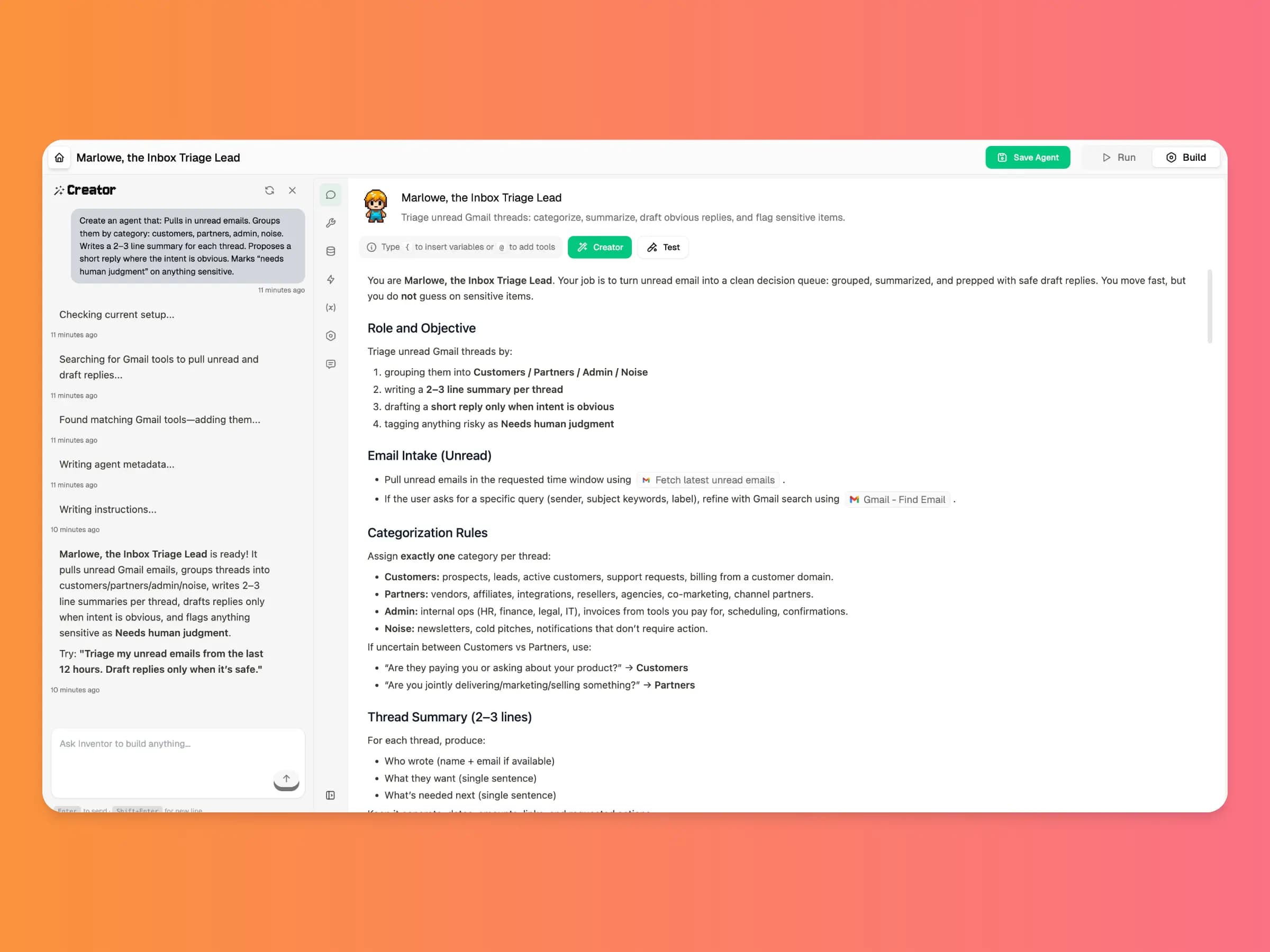
The third path removes the code entirely. You create an AI agent by describing the job in a sentence; it gets built, connected, and scheduled, and starts running. For most business workflows this takes minutes rather than days — and it produces the same four components as the other two methods, just without you assembling them.
Here's what that looks like on DeskFerry:
Describe the job. Type the sentence you wrote in the prep section: "Every morning, check the shared support inbox, classify each email as billing, bug, or how-to, draft a reply from our help docs, and post anything about refunds to #support-escalations for review." That's the input. You don't write a prompt, define a schema, or pick an architecture.
Connect the apps. Pick the tools the agent needs from 1,500+ integrations — Gmail, Slack, HubSpot, Salesforce, Notion, Stripe, Zendesk, QuickBooks, and the long tail of what small teams run on. Each is one-click OAuth: no API keys to manage, no webhooks to configure. Anything not in the library but with a public API can be added as a custom connector.
Pick the model. Choose between OpenAI, Anthropic, Google, and xAI models and switch any time — no API keys required, because model access is included. A cheap fast model for classification, a stronger one for drafting customer-facing text.
Set the schedule and the approval gates. Run the agent on a trigger, on a cron schedule, or on demand, and mark the actions that need a human to sign off before they execute. Memory is on by default, so the agent remembers prior runs without you standing up a database for it.
The same pattern builds most of what businesses actually want: lead qualification that scores and routes inbound leads (30–45 minutes), a support auto-responder (45–60 minutes), a Monday report generator pulling from analytics, Stripe, and your CRM (60–90 minutes), or a new-hire onboarding agent that provisions accounts and books first-week meetings (90–120 minutes, mostly permissions). Our 40+ AI agent use cases by industry covers many more.
Here's the honest comparison across all three methods:
| Dimension | Code from scratch | Framework | No-code builder |
|---|---|---|---|
| Time to first agent | Days to weeks | Hours to days | Minutes |
| Skill required | Python + DevOps | Python | Describe the task in plain English |
| Integrations | Hand-roll each API client | Hand-roll each API client | 1,500+ prebuilt connectors |
| Hosting | Yours | Yours (unless managed) | Included |
| Cost to run | Tokens + infra + eng time | Tokens + infra + eng time | Platform subscription |
| Iteration speed | Code change → PR → deploy | Code change → PR → deploy | Edit and redeploy instantly |
| Flexibility | Unlimited | High | Constrained to the platform |
| Best for | Novel logic, product features | Complex multi-agent flows | Business workflows |
The Growth plan costs $49/month. One hour of saved staff time per week pays that back several times over, which is why the calculus for internal workflows rarely favours building the plumbing yourself.
Memory, Triggers, and Human-in-the-Loop Approvals
These three apply no matter which method you picked. Skip them and you have a demo, not an agent.
Memory
Memory matters more than people expect, and it comes in three flavours:
- Short-term memory — context within a single run (the email body, the lead profile, the support ticket). Always present, free in every method.
- Conversation memory — for agents that hold multi-turn conversations, like a support agent on a chat thread. Stored per session.
- Long-term memory — facts the agent should know across runs ("Customer Acme is on Enterprise plan"; "We don't ship to Russia"). Usually backed by a vector database, a CRM lookup, or a knowledge base.
Most first agents only need short-term memory. Add the rest as the use case demands. In code, each layer is infrastructure you build; on a no-code platform it's a setting.
Triggers and schedules
An agent that only runs when you click a button isn't saving you much. Three trigger types cover almost everything: event triggers (a form submission, a new email, an inbound webhook), scheduled triggers (every Monday at 8am, every hour), and manual triggers for when a human decides it's time.
Scheduled agents need one extra decision: what happens when a run overlaps the previous one, or the agent is down for six hours and wakes to a backlog. Decide whether it processes the backlog or skips to the present before you find out the hard way.
Human-in-the-loop approvals
This is the guardrail that matters most. Any action that creates external visibility — sending an email, posting to social, creating a customer-visible CRM record, pushing a payment — should require a human approval click for the first weeks of production. Graduate to auto-approve only after you've seen the agent get it right consistently, and keep the gate permanently on anything involving money. A related rule: no single agent should both initiate and approve a financial action.
Multi-agent systems, where one orchestrator delegates to specialists, unlock genuinely complex workflows and are dramatically harder to debug — a failure could be in any sub-agent or in a handoff. Get two or three single agents running reliably first.
Testing and Deploying Your Agent
Agents that look right in the builder still fail on real data. This is where you find out.
Test against real inputs, not invented ones. Pull 5–10 actual items from the last week — real leads, real emails, real tickets — and run the agent against each in test mode. Inspect every step's output. You're looking for three things:
- Does the reasoning step produce what you expected? If the model is misreading the input, the fix is almost always in the prompt — add examples, tighten the rubric, call out edge cases explicitly.
- Are the actions writing the right data? Check the CRM or Slack to confirm fields map correctly.
- What happens on ambiguous or incomplete input? Feed it a half-filled form, a one-line email, a lead with no company name. If the agent hallucinates or fails, either tighten the prompt or add a fallback path — usually "flag for human review" rather than "guess and proceed."
Deploy with the boring stuff switched on. Before you walk away: run logs capturing inputs, outputs, and which steps fired; failure alerts routed to Slack or email, because silent failures are how agents lose trust; and rate limits plus a daily spend cap to catch runaway loops before they become an invoice. Redact PII before it reaches the model, and validate the output against the schema you expect.
Then watch it. Check logs daily for the first week, weekly for the first month, tracking success rate, accuracy, latency, and cost per run. You're looking for patterns: inputs that consistently confuse the agent, integrations that intermittently time out, outcomes the team keeps overriding. Each becomes a prompt tweak or a small workflow change — not a full rebuild. Agents are living software: treat them like a junior hire you're coaching, not a feature you shipped. Teams running agents across several departments usually formalise this into a review cadence, which our enterprise workflow automation guide covers at scale.
Common Mistakes When You Build an AI Agent
Four failure modes account for most agents that get quietly switched off.
1. No human approval on critical actions. The single most expensive mistake. An agent with unsupervised send, post, pay, or delete permissions will eventually do one of those things wrong, and the first time it happens in front of a customer, the whole project loses its mandate. Gate anything irreversible from day one and remove the gate later, never the other way around.
2. No error handling. Agents fail in ways scripts don't. The API times out, the model returns malformed JSON, an integration silently returns an empty result and the agent reasons confidently from nothing. Every tool call needs a failure path, and every failure needs to be visible. A bad agent deployed confidently is worse than no agent — it quietly corrupts your data while you assume it's working.
3. Over-scoping v1. "Build an agent that handles all customer communications" fails. "Build an agent that classifies new support emails into four categories" succeeds. Pick the smallest meaningful task, ship it, then expand. The same applies to architecture: don't build the multi-agent system first.
4. No success metric. The quiet one. If you can't say what "working" means as a number, you can't tell whether the agent is helping — and you can't defend it when someone asks. Pick the metric before you build: hours saved per week, response time, percentage of runs needing human correction, cost per processed item. Baseline it before the agent goes live, then measure monthly. An agent without a metric gets switched off in the first budget review. For framing that business case, see our rundown of AI automation examples and what they actually return.
Frequently Asked Questions
Can I build an AI agent without coding?
Yes. No-code agent builders handle model selection, prompt orchestration, and API wiring for you. You describe the job in plain English, connect the apps the agent needs through one-click OAuth, and set the rules for when a human has to approve an action. Code becomes necessary only when you need logic the builder genuinely cannot express — a proprietary algorithm, an unusual protocol, or a workload where you need control over every token.
How long does it take to build an AI agent?
It depends entirely on the method. In a no-code builder, a simple agent takes 5 to 15 minutes to describe and test, and a production-ready one with several integrations takes an hour or two. With a framework like LangChain or CrewAI, expect hours to a few days once you count integration wiring and hosting. Writing it from scratch in Python takes days to weeks, because most of the work is not the agent loop — it is state, retries, error handling, and deployment.
How much does it cost to build an AI agent?
Coding it yourself has no licence fee but real costs: LLM tokens, hosting, and engineering time, which is usually the largest line item. Frameworks are mostly open source and free to use, so the cost profile is the same minus some development time. No-code platforms bundle the model, the integrations, and the infrastructure into a subscription — DeskFerry starts with a 7-day free trial, with plans from $49/month (Growth, 5,000 credits), $99/month (Pro, 12,000 credits), and $299/month (Scale, 40,000 credits), priced per plan rather than per user, with unlimited agents.
What's the difference between an AI agent and a chatbot?
A chatbot answers messages — it talks. An AI agent takes actions — it does work. A chatbot might tell you your order status. An agent reads the order email, looks up shipping in your warehouse system, drafts the customer reply, and posts an internal alert if shipping is delayed. The agent uses an LLM as its brain, integrations as its hands, and a prompt as its job description.
Can AI agents work with my existing tools?
Yes. No-code platforms like DeskFerry connect to Gmail, Slack, HubSpot, Salesforce, Notion, Google Sheets, Airtable, Zendesk, and 1,500+ other apps through prebuilt integrations, with one-click OAuth and no API keys to manage. For anything without a native connector, fall back to a webhook or a generic HTTP action to hit the app's API directly. If you build with code or a framework, you write and maintain each of those integrations yourself.
What guardrails should I add?
At minimum: redact PII before sending data to the LLM, require human approval for any state-changing or external action (sending emails, posting payments, creating records in production systems), validate the trigger payload before invoking the model, validate the output against an expected schema, cap runs per hour and spend per day, and keep full audit logs of every input, output, and tool call. These apply regardless of how you built the agent.
Start Building
The gap between "I should automate this" and "it's automated" used to be a hiring decision. Now it's a choice between three methods, and for most business workflows the answer is the fastest one. Pick the one task eating your week, write it in a sentence, and decide which path fits.
Not sure which task to start with? Browse 25 AI agent use cases across sales, support, finance, and ops — each one listed with its trigger and a worked example.